 LinkForFans
How to Safely Add an OnlyFans Link to Instagram
There is no completely safe way to add an OnlyFans link to Instagram. Creators report links being removed, recommendation reach being limited, and profiles receiving warnings even when they use a popular bio tool or their own domain. The safest practical approach is to keep the path transparent, avoid explicit material on the Instagram-facing page, and monitor Account Status after every meaningful change.
This guide compares three setups visible among established creators. It explains the conversion and account-risk trade-offs without promising a secret link that Instagram cannot inspect. If you need a transparent, adult-friendly landing page, you can start with a free LinkForFans bio page.
Important: No bio link provider can guarantee that Instagram will accept a link, preserve recommendation eligibility, or never restrict an account. Instagram’s systems and policies change, and similar accounts may receive different outcomes.
Why OnlyFans creators struggle with Instagram links
Discussions in r/onlyfansadvice show how inconsistent the experience can be. Creators describe reach warnings after adding bio links, suspected-deception notices after using services advertised as “stealth,” and links being flagged in both bios and Story Highlights.
These posts are individual reports, not controlled evidence that a particular domain always causes a restriction. They still reveal three useful patterns:
- A creator reported an account-reach warning after using a familiar bio-page service (Reddit discussion).
- Another said a service promoted as concealing the destination was identified as deceptive (Reddit discussion).
- Other creators have reported restrictions involving Story Highlights as well as profile links (Reddit discussion).
The practical lesson is that a custom domain, redirect, bio tool, or extra click is not an invisibility shield. Instagram may evaluate the profile, the first URL and where the route eventually leads.
Avoid crawler cloaking—even when it sounds safer
Some services promise to show a harmless page to Meta’s crawler while sending real visitors somewhere else. This is crawler cloaking. It is different from an age warning, a normal redirect, or an in-app browser handoff that behaves consistently for everyone.
Meta defines cloaking as disguising a link’s true destination or showing reviewers different content from what users see. Its published enforcement statement says it removes Pages and bans advertisers found using the practice (Meta’s explanation of cloaking).
The promise can sound attractive: fewer automated checks and a shorter route to the paid page. In reality, cloaking creates an additional policy problem while leaving the adult-content risk in place. If the system is detected, the creator may have to deal with both the destination and the attempt to hide it.
LinkForFans does not cloak pages. Crawlers and visitors receive the same public page and the same 18+ warning on adult destinations. This does not guarantee Instagram approval, but it keeps the setup transparent and avoids deliberate deception. Read more about why LinkForFans does not hide pages from crawlers.
Three ways creators share paid-content links
The screenshots below were supplied on November 23, 2026 and show public profiles at that moment. They illustrate link placement—not endorsement by the creators, proof of performance, or a guarantee that Instagram will approve the same setup elsewhere.
1. Put the link in a Story Highlight
One common approach keeps the main bio focused on the creator’s public brand and uses a Story Highlight as the call to action. The Highlight may have a neutral label such as “Click,” a recognizable icon, or a short message inside the Story.
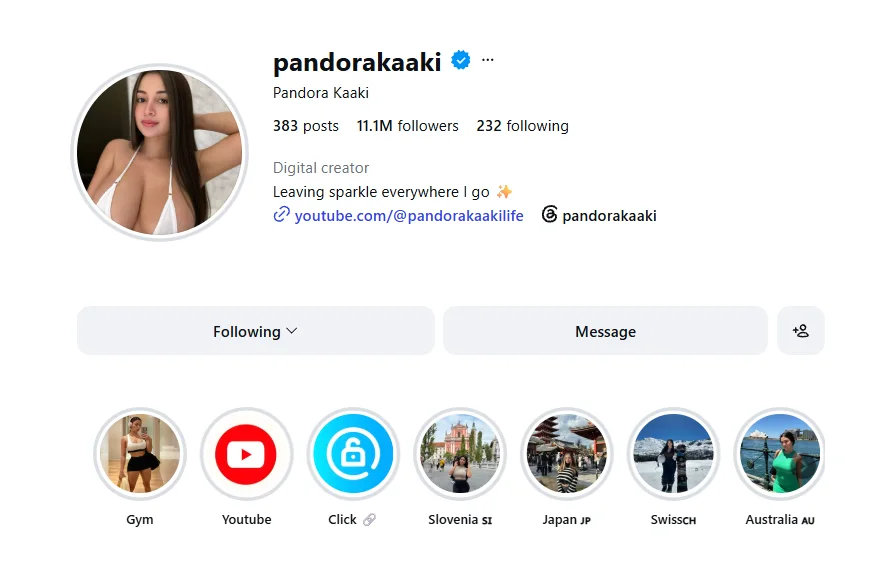
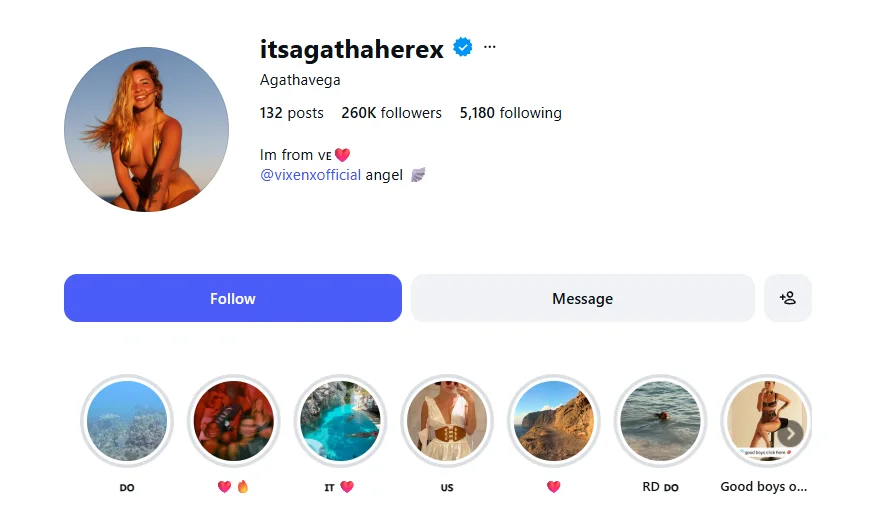
Pandora Kaaki’s profile displayed a dedicated “Click” Highlight with a paid-content-style icon. Agatha Vega used a Highlight whose thumbnail included the message “good boys click here.” A visitor opens the Highlight, reads the Story, and taps its link sticker.
Why creators use it
- The main profile bio remains visually clean.
- A Story can add context before showing a link sticker.
- The creator can replace the Story sequence without rewriting the profile bio.
What can go wrong
- It adds at least one extra tap and some visitors will miss the Highlight.
- Highlight links can still be reviewed or restricted.
- Suggestive Highlight covers or calls to action may draw additional scrutiny.
Treat this as a placement choice, not a bypass. Keep the cover, Story and link wording suitable for Instagram, and check Account Status after publishing.
2. Use a conservative multi-step path
A more cautious structure places another neutral page between Instagram and the page containing the OnlyFans link:
Instagram → creator-owned domain or first bio page → second bio page → OnlyFans
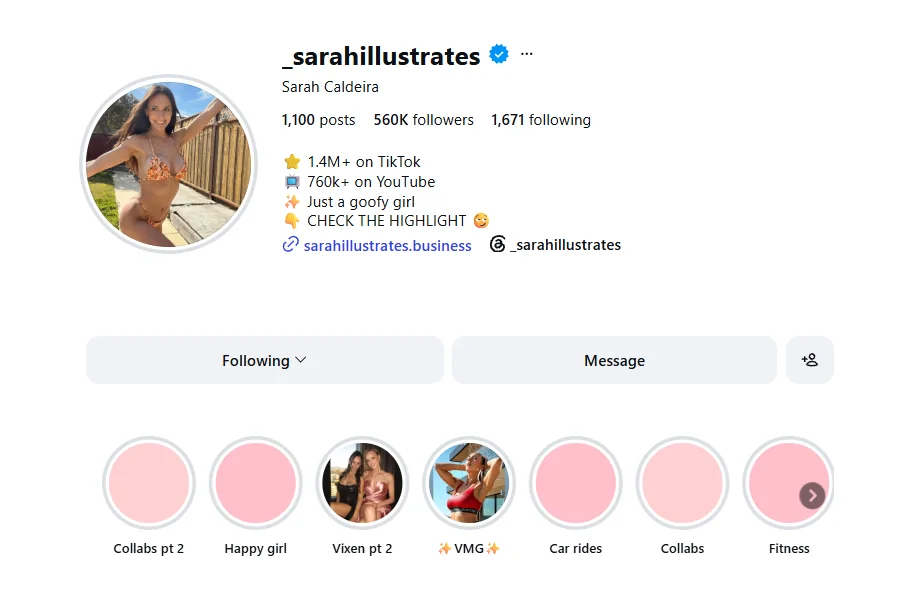
In the supplied example, Sarah Caldeira used her own domain in the Instagram profile. That route led through another link page before the paid destination, putting OnlyFans about three clicks away from Instagram.
This gives the creator more control over the first landing page and keeps the adult destination farther from the Instagram profile. It may be preferable when preserving an established Instagram account matters more than maximizing immediate clicks.
The cost is conversion friction. Every additional page creates another opportunity for a fan to leave, wait for a load, or become unsure about the destination. It is also not guaranteed protection: Instagram may still assess the full route.
A multi-step funnel is not automatically cloaking. If every visitor and crawler can see the same pages and follow the same links, the route is transparent. If software detects Meta and substitutes different content, it becomes cloaking.
3. Add one transparent bio tool to the Instagram profile—at your own risk
The shortest practical route is:
Instagram profile → bio page → OnlyFans
Plenty of creators still use this setup because it has fewer clicks and usually converts better. We do not recommend treating it as safe. The account may remain active while recommendation eligibility and non-follower reach are reduced. For a creator who depends heavily on Instagram discovery, that reach loss can be almost as damaging as a ban.
If you decide the conversion benefit is worth the risk:
- Create a transparent bio page with safe-for-work imagery and honest labels.
- Open Instagram and go to Profile → Edit profile → Links.
- Select Add external link.
- Paste the full HTTPS address of the bio page.
- Use a truthful, non-misleading title.
- Test the public route from another device.
- Check Account Status after the change and again over the following days.
On LinkForFans, OnlyFans should be a Featured link, not a social-profile icon. Adult destinations show an 18+ confirmation before opening. The public page stays the same for fans and platform crawlers, while supported in-app browsers can attempt to hand the page to Safari or Chrome. This handoff improves usability; it does not hide the destination.
Read how in-app browser handoff works and how the 18+ warning works before publishing.
Compare the three Instagram setups
| Setup | Fan journey | Conversion friction | Main trade-off |
|---|---|---|---|
| Story Highlight | Profile → Highlight → Story link → bio or paid page | Medium | Cleaner bio, but Highlights can still be restricted and are easier to miss. |
| Multi-step path | Instagram → first page → second page → paid page | High | More separation and control, but more drop-off and no guarantee. |
| One bio page in profile | Instagram → bio page → paid page | Low | Best conversion potential, but use at your own risk because reach may be limited. |
Choose based on the value of the Instagram account, how much discovery traffic it produces, and how much conversion loss you can accept. A new secondary account may tolerate more experimentation than a long-established profile that drives most of a creator’s income.
Check Instagram Account Status after every change
Do not wait for an obvious ban. Instagram’s Account Status area can show whether content or profile elements may lead to restrictions and whether the account is eligible to be recommended to non-followers. Instagram provides official instructions for reviewing this information in its Account Status help page.
Use a simple change log whenever you test a link setup:
- Record the date, profile link, link title and setup type.
- Take a screenshot of Account Status before making the change.
- Change only one important element at a time.
- Check Account Status shortly after the update and over the next several days.
- Compare reach, profile visits, Story views and bio-link clicks with the previous period.
- If recommendation eligibility changes, remove the suspected link and follow Instagram’s review process where available.
Changing the domain, title, profile copy and Highlight simultaneously makes it difficult to identify what triggered the problem. Controlled changes produce better evidence than repeatedly rotating URLs.
Reduce risk before publishing
Keep the Instagram-facing experience safe for work
The first page should not surprise the visitor or platform reviewer. Use a non-explicit profile photo, avoid nudity and explicit sexual language, and make the page title consistent with the Instagram call to action. An 18+ warning should appear before adult destinations, not as a substitute for keeping the landing page appropriate.
Avoid misleading labels
Do not label an OnlyFans destination as an unrelated shop, news article or harmless download. A neutral label such as “Exclusive content — 18+” is clearer than wording designed to disguise what opens next.
Test the route like a visitor
Open the Instagram profile on a separate phone, tap every step, and confirm that the correct page loads in both the in-app browser and Safari or Chrome. Look for broken redirects, cookie overlays blocking buttons, slow images and unexpected login screens.
Maintain channels outside Instagram
Build an email list or maintain another audience channel such as Telegram or X. If Instagram limits reach or removes the account, an independent contact channel gives fans a legitimate way to find updates without relying on evasive linking tactics.
Keep evidence of your setup
Save dated screenshots of the bio, Story Highlight, landing page and Account Status. This makes it easier to understand what changed, prepare an appeal, or revert to the last setup that did not show an obvious warning.
What to do if Instagram limits the account
If Account Status indicates that the profile is not eligible for recommendations or identifies a link-related problem:
- Remove the suspected link or Highlight instead of immediately replacing it with a disguised version.
- Review the Instagram-facing page for adult imagery, misleading text or broken redirects.
- Use Instagram’s review or appeal option when the interface offers one.
- Allow time for the status to update before testing another configuration.
- Restore traffic through established alternative channels while the issue is reviewed.
Rapidly switching among redirect domains can look less trustworthy and prevents useful testing. The goal is to fix the underlying profile or destination issue, not to play a domain-rotation game with automated enforcement.
The honest answer: reduce risk, never promise immunity
There is no single “safe OnlyFans link for Instagram.” Current creator reports include restrictions involving direct links, bio tools, custom domains and Story Highlights. No link provider controls Instagram’s decisions.
What you can control is the integrity of the funnel: show the same page to visitors and crawlers, use an 18+ warning, keep the Instagram-facing experience compliant, monitor Account Status, test one change at a time, and accept the conversion cost when choosing a more conservative route.
Create a free LinkForFans page when you want one transparent place for paid-content links, social profiles and updates. Use the setup that fits your risk tolerance, and keep every step honest.