Keep the roster together
Search and sort pages by name, views, CTR, traffic source, status or blocked countries. Duplicate a page to get another creator started faster.
LINKFORFANS FOR AGENCIES
Give each OnlyFans creator a page that feels like theirs. Keep links, country rules and performance in view across your whole agency.

BUILT FOR A CREATOR ROSTER
Start with room for 20 bio pages. Manage them from one account, with page and link limits that can be increased for a specific agency.
Search and sort pages by name, views, CTR, traffic source, status or blocked countries. Duplicate a page to get another creator started faster.
Add, reorder and pause links on each page. Give creators a clear route to their OnlyFans, socials and other destinations.
Invite members to help manage the agency and switch between creator pages from the same account.
When someone opens a creator page inside a supported social app, LinkForFans automatically attempts to open it in their regular browser. Some apps may prevent the handoff.
BUILT FOR SOCIAL TRAFFIC
When fans tap a creator’s bio link inside Instagram, LinkForFans automatically attempts to open the page in Safari or Chrome. They can then follow the OnlyFans link from their regular browser, with no extra setup for your team.
Whether the handoff succeeds depends on the visitor’s app and device.
COUNTRY RULES
Choose restricted countries for each creator page. Visitors in those countries can see alternative links or be sent to a temporary HTTPS redirect.
Each creator page can have its own rules.
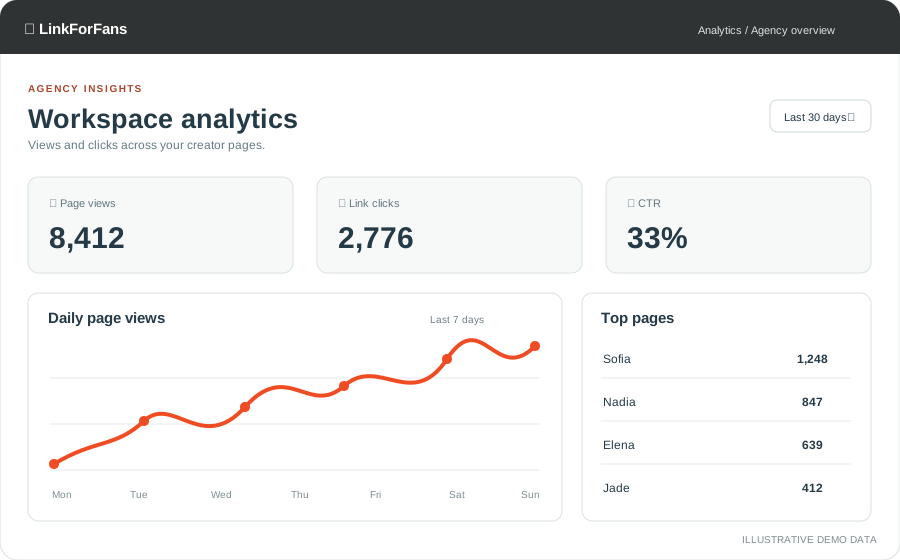 Analytics overview · Illustrative demo data
AGENCY ANALYTICS
Review page views, link clicks, CTR, daily trends, countries and referrers. Compare creators from your agency overview, then open a page report for more detail.
Analytics can be enabled across the agency from workspace settings.
CROSS-PROMOTE YOUR ROSTER
Add a Friends section below a creator’s links. Choose a title and one or two columns, drag models into order, and decide whether a card opens their bio page or their OnlyFans link when available.
Sync the section across your agency or disable it across all pages when you need to.




READY TO BRING YOUR ROSTER TOGETHER?
Agency access is by invitation. Tell us about your team and the number of creator pages you need.
Contact us about agency access MayaAll my favorite places, in one spot.